

Timestream
Introduction
Section titled “Introduction”LocalStack contains basic support for Timestream time series databases, including these operations:
- Creating databases
- Creating tables
- Writing records to tables
- Querying timeseries data from tables
The supported APIs are available on our API Coverage Page (Timestream Query/Timestream Write, which provides information on the extent of Timestream integration with LocalStack.
Getting Started
Section titled “Getting Started”The following example illustrates the basic operations, using the lstk aws command line.
First, we create a test database and table:
lstk aws timestream-write create-database --database-name testDBlstk aws timestream-write create-table --database-name testDB --table-name testTableWe can then add a few records with a timestamp, measure name, and value to the table:
lstk aws timestream-write write-records --database-name testDB --table-name testTable --records '[{"MeasureName":"cpu","MeasureValue":"60","TimeUnit":"SECONDS","Time":"1636986409"}]'lstk aws timestream-write write-records --database-name testDB --table-name testTable --records '[{"MeasureName":"cpu","MeasureValue":"80","TimeUnit":"SECONDS","Time":"1636986412"}]'lstk aws timestream-write write-records --database-name testDB --table-name testTable --records '[{"MeasureName":"cpu","MeasureValue":"70","TimeUnit":"SECONDS","Time":"1636986414"}]'Finally, we can run a query to retrieve the timeseries data (or aggregate values) from the table:
lstk aws timestream-query query --query-string "SELECT CREATE_TIME_SERIES(time, measure_value::double) as cpu FROM testDB.testTable WHERE measure_name='cpu'"{ "Rows": [ { "Data": [ { "TimeSeriesValue": [ { "Time": "2021-11-15 14:26:49.000000000", "Value": { "ScalarValue": "60" } },...Scheduled queries
Section titled “Scheduled queries”LocalStack supports scheduled queries, which run a query on a schedule expression and write the results to a target table.
LocalStack runs each enabled scheduled query automatically on its schedule, and you can also run one on demand with the ExecuteScheduledQuery API.
Create a scheduled query
Section titled “Create a scheduled query”The following example averages the cpu measure of testTable every minute and writes the averages to a cpuAverages table.
Create the target table, an SNS topic for notifications, and an S3 bucket for error reports, then write a recent record to query:
lstk aws timestream-write create-table --database-name testDB --table-name cpuAverageslstk aws sns create-topic --name scheduled-query-notificationslstk aws s3 mb s3://scheduled-query-errorslstk aws timestream-write write-records --database-name testDB --table-name testTable \ --records "[{\"Dimensions\":[{\"Name\":\"host\",\"Value\":\"server1\"}],\"MeasureName\":\"cpu\",\"MeasureValue\":\"50\",\"MeasureValueType\":\"DOUBLE\",\"TimeUnit\":\"SECONDS\",\"Time\":\"$(date +%s)\"}]"Save the following target configuration, which maps the query results to records in cpuAverages:
{ "TimestreamConfiguration": { "DatabaseName": "testDB", "TableName": "cpuAverages", "TimeColumn": "binned_time", "DimensionMappings": [ {"Name": "host", "DimensionValueType": "VARCHAR"} ], "MultiMeasureMappings": { "TargetMultiMeasureName": "cpu_stats", "MultiMeasureAttributeMappings": [ {"SourceColumn": "avg_cpu", "MeasureValueType": "DOUBLE"} ] } }}Create the scheduled query with the CreateScheduledQuery API.
The @scheduled_runtime parameter holds the scheduled time of each run:
lstk aws timestream-query create-scheduled-query \ --name cpu-averages \ --query-string "SELECT host, bin(time, 1m) AS binned_time, AVG(measure_value::double) AS avg_cpu FROM testDB.testTable WHERE measure_name = 'cpu' AND time BETWEEN @scheduled_runtime - 10m AND @scheduled_runtime GROUP BY host, bin(time, 1m)" \ --schedule-configuration ScheduleExpression="rate(1 minute)" \ --notification-configuration SnsConfiguration={TopicArn=arn:aws:sns:us-east-1:000000000000:scheduled-query-notifications} \ --target-configuration file://target-configuration.json \ --scheduled-query-execution-role-arn arn:aws:iam::000000000000:role/scheduled-query-role \ --error-report-configuration S3Configuration={BucketName=scheduled-query-errors}{ "Arn": "arn:aws:timestream:us-east-1:000000000000:scheduled-query/cpu-averages-b629fa28b484baa5"}The ARN ends with a generated suffix. Store it in a variable for the following commands:
SCHEDULED_QUERY_ARN=$(lstk aws timestream-query list-scheduled-queries \ --query "ScheduledQueries[?Name=='cpu-averages'].Arn" --output text)Automatic runs
Section titled “Automatic runs”LocalStack checks enabled scheduled queries about once a minute, so each automatic run starts up to about 60 seconds after its scheduled time, and never before it.
After the first run, describe the scheduled query with the DescribeScheduledQuery API:
lstk aws timestream-query describe-scheduled-query \ --scheduled-query-arn "$SCHEDULED_QUERY_ARN" \ --query 'ScheduledQuery.{State:State,PreviousInvocationTime:PreviousInvocationTime,NextInvocationTime:NextInvocationTime,LastRunSummary:LastRunSummary}'{ "State": "ENABLED", "PreviousInvocationTime": 1790772595.0, "NextInvocationTime": 1790772655.0, "LastRunSummary": { "InvocationTime": 1790772595.0, "TriggerTime": 1790772622.73564, "RunStatus": "AUTO_TRIGGER_SUCCESS", "ExecutionStats": { "ExecutionTimeInMillis": 198, "DataWrites": 1024, "BytesMetered": 0, "CumulativeBytesScanned": 0, "RecordsIngested": 1, "QueryResultRows": 1 } }}InvocationTime is the scheduled time, which is also the value of @scheduled_runtime, and TriggerTime is when the run started.
Automatic runs behave as follows:
- Each automatic run records
AUTO_TRIGGER_SUCCESSorAUTO_TRIGGER_FAILUREinLastRunSummaryand updatesPreviousInvocationTime. - Runs of the same scheduled query never overlap. If several invocations are due at the same check, only the latest one runs.
- LocalStack does not catch up on invocations missed while the scheduled query was disabled or LocalStack was stopped.
- A failed run disables the scheduled query and is recorded in
RecentlyFailedRuns. - With persistence enabled, automatic runs resume after LocalStack restarts.
To stop the automatic runs, disable the scheduled query with the UpdateScheduledQuery API.
Set --state ENABLED to resume them from the next scheduled invocation:
lstk aws timestream-query update-scheduled-query \ --scheduled-query-arn "$SCHEDULED_QUERY_ARN" \ --state DISABLEDRun a scheduled query manually
Section titled “Run a scheduled query manually”To run a scheduled query outside its schedule, call the ExecuteScheduledQuery API with the invocation time to use as @scheduled_runtime:
lstk aws timestream-query execute-scheduled-query \ --scheduled-query-arn "$SCHEDULED_QUERY_ARN" \ --invocation-time "$(date +%s)"The command returns no output.
Manual runs record MANUAL_TRIGGER_SUCCESS or MANUAL_TRIGGER_FAILURE in LastRunSummary:
lstk aws timestream-query describe-scheduled-query \ --scheduled-query-arn "$SCHEDULED_QUERY_ARN" \ --query 'ScheduledQuery.LastRunSummary.RunStatus'"MANUAL_TRIGGER_SUCCESS"Resource Browser
Section titled “Resource Browser”The LocalStack Web Application provides a Resource Browser for managing Timestream databases. You can access the Resource Browser by opening the LocalStack Web Application in your browser, navigating to the Resources section, and then clicking on Timestream under the Database section.
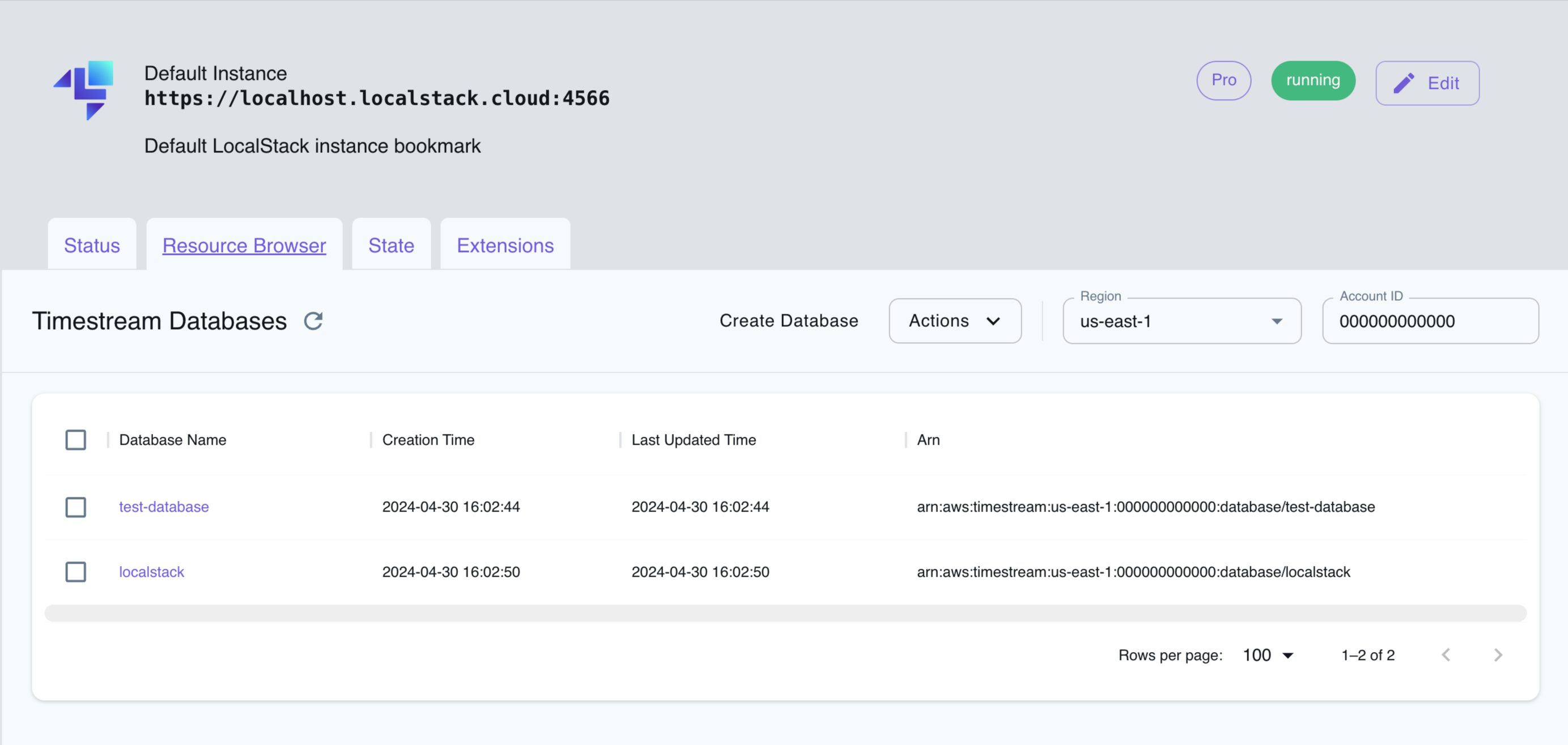
The Resource Browser allows you to perform the following actions:
- Create Database: Create a new Timestream database by clicking on the Create Database button and providing a name for the database among other optional details.
- Create Table: Create a new Timestream table by clicking on the Create Table button in the database view and providing a name for the table among other optional details.
- Run Query: Run a Timestream query by clicking on the Run Query button in the table view and providing a query string.
- View Database/Table Details: Click on a database or table to view its details, including the schema, retention policy, and other metadata.
- Delete Database/Table: Delete the Timestream database/table by selecting it and clicking on the Actions button followed by Remove Selected button.
Current Limitations
Section titled “Current Limitations”LocalStack’s Timestream implementation is under active development and only supports a limited set of operations, please refer to the API Coverage pages for an up-to-date list of implemented and tested functions within Timestream-Query and Timestream-Write.
If you have a usecase that uses Timestream but doesn’t work with our implementation yet, we encourage you to get in touch, so we can streamline any operations you rely on.
API Coverage (Timestream Query)
Section titled “API Coverage (Timestream Query)”11 of 15 operations implemented
Available from the Ultimate plan. Licensing details
Find an API
Search the full operation list, then sort the table to compare current support.
Loading operations…
| Verified on Kubernetes | ||
|---|---|---|
| Loading operations… | ||
Complete static API list All 15 operations and their current support status
| Operation | Status |
|---|---|
| CancelQuery | Not implemented |
| CreateScheduledQuery | Implemented |
| DeleteScheduledQuery | Implemented |
| DescribeAccountSettings | Not implemented |
| DescribeEndpoints | Implemented |
| DescribeScheduledQuery | Implemented |
| ExecuteScheduledQuery | Implemented |
| ListScheduledQueries | Implemented |
| ListTagsForResource | Implemented |
| PrepareQuery | Not implemented |
| Query | Implemented |
| TagResource | Implemented |
| UntagResource | Implemented |
| UpdateAccountSettings | Not implemented |
| UpdateScheduledQuery | Implemented |
API Coverage (Timestream Write)
Section titled “API Coverage (Timestream Write)”15 of 19 operations implemented
Available from the Ultimate plan. Licensing details
Find an API
Search the full operation list, then sort the table to compare current support.
Loading operations…
| Verified on Kubernetes | ||
|---|---|---|
| Loading operations… | ||
Complete static API list All 19 operations and their current support status
| Operation | Status |
|---|---|
| CreateBatchLoadTask | Not implemented |
| CreateDatabase | Implemented |
| CreateTable | Implemented |
| DeleteDatabase | Implemented |
| DeleteTable | Implemented |
| DescribeBatchLoadTask | Not implemented |
| DescribeDatabase | Implemented |
| DescribeEndpoints | Implemented |
| DescribeTable | Implemented |
| ListBatchLoadTasks | Not implemented |
| ListDatabases | Implemented |
| ListTables | Implemented |
| ListTagsForResource | Implemented |
| ResumeBatchLoadTask | Not implemented |
| TagResource | Implemented |
| UntagResource | Implemented |
| UpdateDatabase | Implemented |
| UpdateTable | Implemented |
| WriteRecords | Implemented |